LACIMA SpriteExporter — Export Photoshop Layers as PNG Without Trimming
A downloadable game
Photoshop always crops your PNGs. Sometimes that ruins everything.
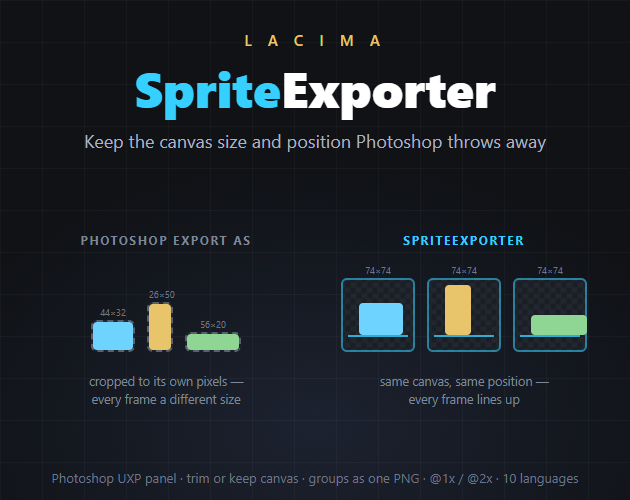
Export a 3072×1024 layer and Photoshop hands you a 2734×437, cropped to its opaque pixels. For a lone icon that’s fine. For animation frames, or the elements of a UI screen, it’s the end of the world: every file now has a different origin, and the alignment you built in the PSD has to be rebuilt by hand in the engine.
People have been asking Photoshop for a way to turn this off for five years. The accepted answer is to paste a full-canvas mask onto every single layer — a hack, by the admission of the person who suggested it. Since Photoshop 2026, even the hack stopped working, and on Apple Silicon the legacy exporter isn’t there to fall back on.
SpriteExporter has a dropdown for it.
- Keep canvas size and position — every layer exported at full document size, each element exactly where it sits. Drop the folder into your engine and everything still lines up.
- Trim to artwork — the classic behaviour, each PNG as small as its content, when that’s what you actually want.
And it exports groups.
A button is a group: background, icon, label. Photoshop exports the pieces; you wanted the button. Choose Each top-level group, merged and every group leaves as one flattened PNG. Your document isn’t touched — the merge happens on a copy.
The rest of the pass, handled
- Layer name becomes the file name, with a prefix of your choosing; illegal characters are handled for you
- Hidden means hidden: a layer inside a hidden group is skipped even if its own eye is on — which is what you meant
- @1x or @2x in one pass, scaled nearest-neighbour so pixel art stays pixel art
- Optional padding for atlas breathing room (in Trim mode, where a margin means something)
- Duplicate file names are listed back to you at the end, instead of quietly disappearing
- Your document is left exactly as it was
- Panel localised in 10 languages, following Photoshop’s own language
Requirements
- Adobe Photoshop 2023 (v24.0) or later, with Creative Cloud installed
- Tested on Photoshop 2026 (Windows). macOS should work — UXP is cross-platform and there’s no OS-specific code — but it hasn’t been tried on a Mac yet; full refund within 14 days if it doesn’t work for you
What you get
- The plugin as a .ccx, installed by double-click
- Your license key, the moment you buy it: enter your purchase email at lacima-license.lacimatools.workers.dev and it’s issued on the spot — no waiting on me, whatever the time zone
- Offline licence — no account, no server, no data ever leaves your machine
- All 1.x updates included
Launch price — this is an early version of a tool in active development: the price will grow as features land, but buy now and every 1.x update is yours at no extra cost.
Who’s behind this
I’m Francesco Clemente — I design UI and write sound and music for games, including Placid Plastic Duck Simulator, Placid Plastic Deck, Starsand, Lootborne and Slowly Sliding Duck.
I build these tools first of all to make my own work faster: SpriteExporter exists because shipping a UI screen meant an afternoon of cutting layers out by hand, every time the artwork changed.
Every LACIMA tool is in active development. If something is missing or gets in your way, write to me — I read everything, and good ideas get built.
Support: lacima.tools@gmail.com
Purchase
In order to download this game you must purchase it at or above the minimum price of $9.99 USD. You will get access to the following files:
Leave a comment
Log in with itch.io to leave a comment.